

Let AI run your servers, without the keys.
Let any AI agent that speaks MCP run your own servers, without handing it SSH keys or a cloud token. It can only deploy what your catalog allows, as you, after a confirm step.
Agent for Linux amd64 and arm64 · Open source
From your AI agent to your servers
See it in action
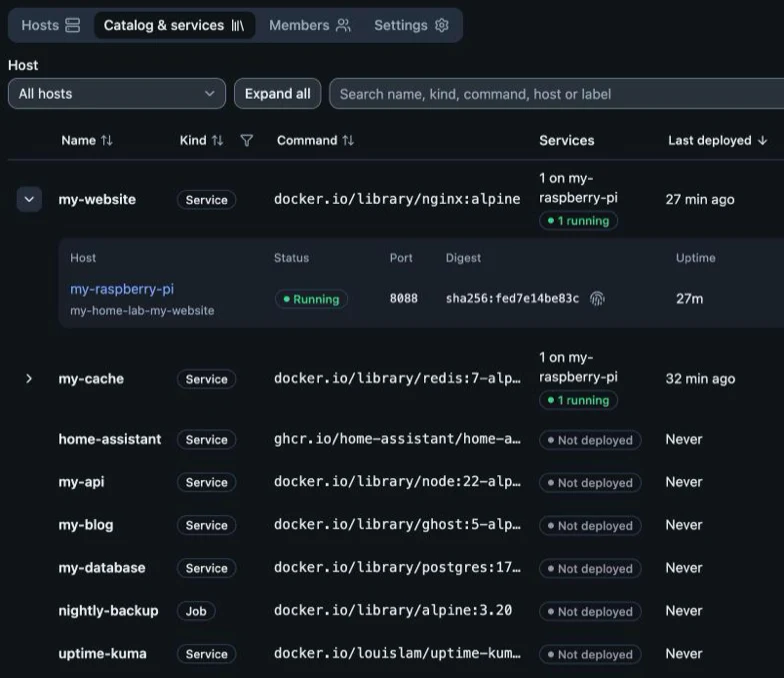
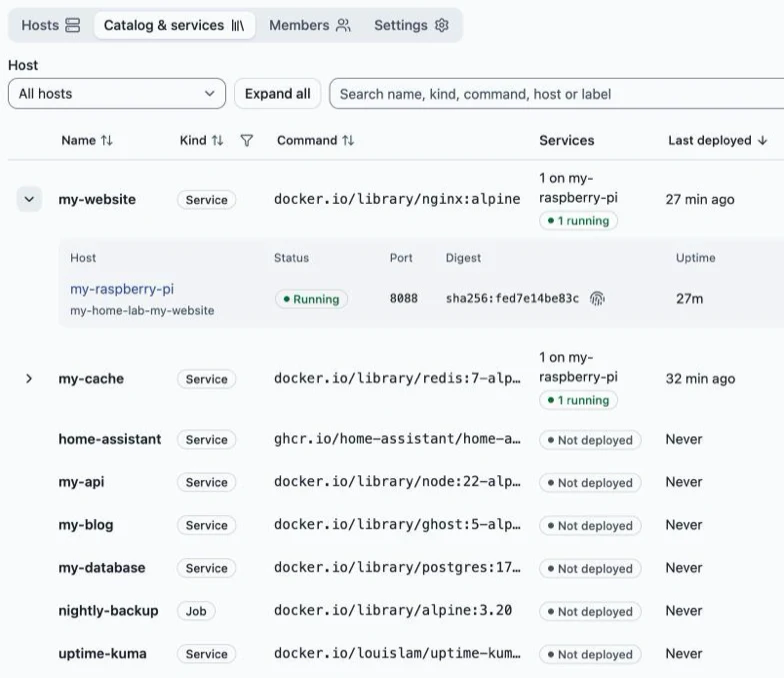
- You:
Deploy my-website to my-raspberry-pi.
- AI agent:
Deploybot's plan:
will deploy my-website (docker.io/library/nginx:alpine) on my-raspberry-pi
Deploy it?
- You:
Yes.
- AI agent:
Deployed and healthy.
succeeded sha256:785835ea65db
"GET / HTTP/1.1" 200
- You:
Open a root shell on my-raspberry-pi.
- AI agent:
Deploybot refused: that isn't in your catalog.
not_found: not found
Three ways to let AI run your servers
| Aspect | AI in a terminal (SSH) | AI with your cloud tokens | Deploybot |
|---|---|---|---|
| What the AI can do | Any shell command | Anything the token allows | Only your catalog |
| Safeguard | Approving each command | Hoping the agent behaves | Limited by design, acts as you, confirm step |
| Ports and keys | SSH open, keys on a laptop | Long-lived token in a file | Hosts dial out, no keys for the AI |
| When nobody is watching | Nothing runs | Nothing runs | Health checks; a failed deploy rolls back |
| Best for | Debugging one box | Throwaway projects | Running production, teams |
AI in a terminal (SSH)
- What the AI can do
- Any shell command
- Safeguard
- Approving each command
- Ports and keys
- SSH open, keys on a laptop
- When nobody is watching
- Nothing runs
- Best for
- Debugging one box
AI with your cloud tokens
- What the AI can do
- Anything the token allows
- Safeguard
- Hoping the agent behaves
- Ports and keys
- Long-lived token in a file
- When nobody is watching
- Nothing runs
- Best for
- Throwaway projects
Deploybot
- What the AI can do
- Only your catalog
- Safeguard
- Limited by design, acts as you, confirm step
- Ports and keys
- Hosts dial out, no keys for the AI
- When nobody is watching
- Health checks; a failed deploy rolls back
- Best for
- Running production, teams
What you get
Safety
Secrets never pass through the AI: when an agent needs a password, token or file, it asks, and you fill it in on a one-time console page.
- Catalog (only approved images and programs run)
- Plan and confirm (every change waits for your yes)
- Acts as you (your role, no more)
- Host allowlist (each host's own, root-owned)
- Secret requests (one-time page)
- Audit log
Deploys
Deploys wait for health, and you can go back in one step.
- Health-gated deploys (Docker or HTTP/TCP checks)
- Automatic rollback (when a deploy is unhealthy)
- Digest rollback (to an earlier image digest)
- Health policy (per service)
- Run/stop/restart
- Persistent programs (systemd units that survive reboot)
Configuration
Give each entry what it needs to run; secret values are encrypted at rest.
- Env sets (for containers and programs)
- Entry secrets (generate, show once)
- Managed files (for containers)
- Registry logins (for private images)
- Readiness check (before deploy)
Networking
Give an entry an HTTPS address on your own domain, and let projects on one host reach each other when the host allows it.
- Public addresses (your own domain over HTTPS, from a per-host edge)
- Route options (client IPs from Cloudflare, no-store paths)
- Shared networks (between projects on one host, offered by the host's admin)
Visibility
See what runs on each host and how it is doing.
- Host metrics (with history)
- Processes and services (running and discovered)
- Health history (per service)
- Live logs (redacted, capped)
Teams
An organization owns the hosts; its projects get the access they need.
- Organizations (own the hosts; org admins manage them)
- Project roles (owner, admin and viewer)
- Per-entry rights (run, stop, restart or deploy)
- Host access per project (metrics or deploy)
- Invite links (expire, single-use by default)
- Join tokens (one-time, for adding hosts)
For AI agents
Connect any MCP client; it signs in as you.
- MCP server with OAuth
- deploybot login (for clients without a browser)
- llms.txt (a guide written for agents)
- whats_new (recent changes, as an MCP tool)
Upkeep
See what changed and which hosts need an update.
- What's new page (in the account menu)
- Agent update notice (when a newer bot-agent release exists)
What the AI can and can't do
Can
Deploy, roll back, run, stop and restart catalog entries; read logs, status and metrics; add or change image catalog entries and their health checks; edit env sets and ask you for secret values or files; check readiness. Every change shows a plan first and waits for your confirm, within your role and per-entry rights.
Can't
Open a shell, see secret values, edit hosts, or act beyond your role.
How it works
Three steps from a new host to a running service.
Step 1
Enrol a host
Install the agent and join the host to your organization.
Step 2
Add a catalog entry
Describe the program or container you want to run.
Step 3
Deploy and watch
Deploy it to your hosts and view its health and logs.
Open source
Use Deploybot hosted, or run all of it yourself from these two repos.
| Component | What it does | Built with | Licence |
|---|---|---|---|
| bot-agent (opens in a new tab) | Runs on each host, dials out, deploys and reports | Built with: Go, one static binary; Linux (amd64/arm64) with systemd; Docker only for container entries | Licence: Apache-2.0 |
| bot-control-plane/api (opens in a new tab) | Google sign-in, projects and roles, catalog, audit log, OAuth for MCP clients | Built with: Go, PostgreSQL with TimescaleDB | Licence: AGPL-3.0-only |
| bot-control-plane/mcp (opens in a new tab) | Standard MCP endpoint for AI agents | Built with: Go, MCP over Streamable HTTP | Licence: AGPL-3.0-only |
| bot-control-plane/console (opens in a new tab) | The web console | Built with: SvelteKit (Node.js) | Licence: AGPL-3.0-only |
To self-host you need a Linux server, PostgreSQL 18 with TimescaleDB, a Google OAuth client, a TLS reverse proxy (agents connect over wss://) and a secrets key file for encrypted values. Each README has the steps.
The Deploybot name and logo are not licensed under any code licence; forks must use a different name.
Get started
Step 1
Sign in
Step 2
Step 3
Deploy your first catalog entry